
Discord Aesthetic Font: How to Get Stylish Bio and Server Names (2026)
If you spend any time on Discord, you already know that the default text settings can feel incredibly repetitive. Whether you are setting up a cozy community hub, a gaming clan base, or just tweaking your personal profile, using a discord aesthetic font is the absolute best way to break away from the standard formatting and inject real personality into your digital space.

Customizing your profile isn’t just about looking cool; it is about establishing a clear visual identity. With millions of active users on the platform, standard text blends into the background. Switching up your typography catches the eye instantly, helping your community or personal brand stand out in a crowded sidebar.
Why Standard Discord Fonts Feel So Limited
By default, Discord relies on a clean but rigid font family (primarily Uni Sans and Whitney) to keep the interface legible across desktop and mobile apps. While this is great for reading fast-paced chat logs, it gives you zero built-in options to change text styles in your bio, channel names, or nickname.
To bypass this restriction, the internet relies on Unicode characters. When you use a specialized typography tool, it doesn’t actually change the font aesthetics file inside Discord. Instead, it swaps regular English letters for unique mathematical symbols and alphabetic characters that look like stylized text. Because these symbols are universally recognized by modern operating systems, they display perfectly on Windows, Mac, iOS, and Android without breaking the application.
Try It Live: Mini Font Generator
Type any text below to instantly convert it into copyable Discord-friendly aesthetic designs!
Aesthetic Bio 2026
𝙼𝚘𝚗𝚘𝚜𝚙𝚊𝚌𝚎 / 𝚃𝚢𝚙𝚎𝚠𝚛𝚒𝚝𝚎𝚛
��𝚑�𝚑�p ��� ����
𝔊𝔬𝔱𝔥𝔦𝔠 / 𝔒𝔩𝔡 𝔈𝔫𝔤𝔩𝔦𝔰𝔥
��𝔧�𝔧�� ��� ����
𝔻𝕠𝕦𝕓𝕝𝕖 𝕊𝕥𝕣𝕦𝕔𝕜
��𝕛�𝕛�� ��� ��𝔻
🄱🄾🅇🄴🄳 / 🅂🅀🅄🄰🅁🄴🄳
��🄹�🄹�� ��� ����
sᴍᴀʟʟ ᴄᴀᴘs
ᴀᴇsᴛʜᴇᴛɪᴄ ʙɪᴏ 2026
Ⓒⓘⓡⓒⓛⓔⓓ / Ⓑⓤⓑⓑⓛⓔ
Ⓐⓔⓢⓣⓗⓔⓣⓘⓒ Ⓑⓘⓞ ②⓪②⑥
How to Generate and Use a Discord Aesthetic Font
Transforming your text takes less than a minute. You do not need to install any sketchy mods or third-party plugins that violate Discord’s terms of service. You just need a reliable web-based text generator.
Step 1: Generate Your Custom Typography
Open your favorite online aesthetic text generator. Type the exact phrase, username, or channel name you want to convert into the input box. The tool will instantly convert your plain text into dozens of variations, including cursive, bold script, gothic, tiny caps, and double-struck lettering.
Step 2: Copy and Test the Output
Scroll through the generated styles and select the one that matches your personal or server theme. Click copy. Before pasting it into a live server title, it is a smart habit to paste it into a private DM or a personal testing channel. This ensures all the special symbols render correctly on your current device.
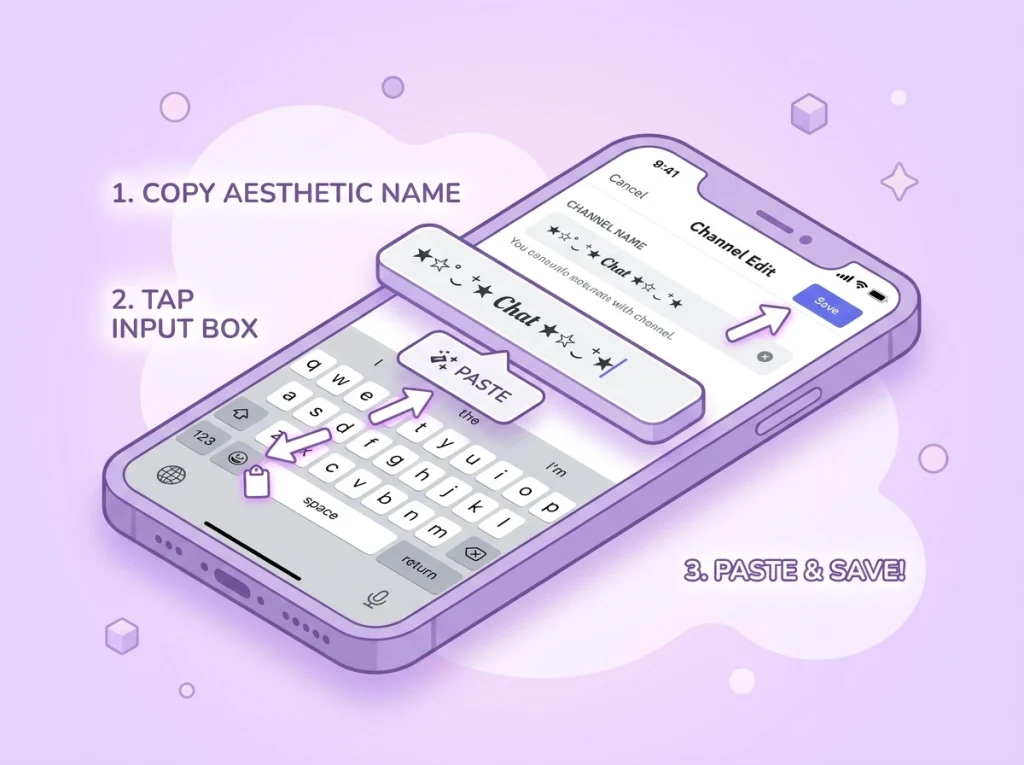
Step 3: Update Your Profile or Server Settings
For Bios & Nicknames: Head to User Settings > User Profile. Paste your copied text into the “About Me” section or your username field and hit save.
For Channel & Server Names: If you have admin permissions, right-click a channel, select Edit Channel, and paste the stylized text directly into the Channel Name box.
Best Styles for Bios, Usernames, and Servers
Not all text styles serve the same purpose. Choosing the right vibe depends heavily on what part of the app you are customizing. Here is a curated guide to styles that are highly effective in modern layouts:
𝙼𝚘𝚗𝚘𝚜𝚙𝚊𝚌𝚎 & 𝚃𝚢𝚙𝚎𝚠𝚛𝚒𝚝𝚎𝚛
Perfect for clean channel names, developer bios, or highly structured status updates. It has maximum compatibility across all devices.
🄱🄾🅇🄴🄳 & 🅂🅀🅄🄰🅁🄴🄳
Ideal for server category headers or technical channel names. It looks incredibly structured, solid, and neat.
𝔊𝔬𝔱𝔥𝔦𝔠 & 𝔒𝔩𝔡 𝔈𝔫𝔤𝔩𝔦𝔰𝔥
Highly popular among gaming communities, dark-themed servers, and clan names. It gives off a powerful, classic vintage aesthetic.
SMALL CAPS FORMAT
Excellent for subtle, minimalist formatting where you want a clean look without looking overly chaotic or cluttered.
Important Rules for Accessibility and Search
While decorating your text is incredibly fun, going overboard can ruin the user experience for your friends or community members. Keep these crucial tips in mind to balance style with functionality:
Screen Reader Compatibility
Screen readers used by visually impaired individuals read Unicode symbols by their literal mathematical names. For example, a bio written completely in bold script will sound like “Mathematical Bold Script Capital H…” to a screen reader. Use custom text for decorative highlights, not full paragraphs.
- Keep Channel Names Searchable: If users cannot easily type a channel name because it is covered in complex symbols, they won’t be able to use Discord’s quick switcher (Ctrl + K or Cmd + K) to navigate your server. Keep core text readable.
- Check Mobile Rendering: Some highly complex Unicode symbols or older text styles render as empty rectangular blocks (☐) on older Android or iOS devices. Stick to widely supported character sets to ensure every visitor sees your design as intended.
- Moderation Concerns: If you are a server owner, forcing users to keep their nicknames readable makes it much easier for staff members to tag (
@) them during moderation or support issues.
Final Thoughts
Using a distinct typography style completely changes how people perceive your digital presence. By picking the right style, avoiding over-cluttered symbols, and keeping accessibility in mind, you can craft a stunning layout that looks incredibly professional. Find a style that speaks to you, update your profile, and give your space a completely fresh look.