
Video Typography & Visual Brand System Design Guide
In the digital-first creator economy, visual noise is at an all-time high. Every second, thousands of hours of video content compete for a user’s fleeting attention span. While most creators spend weeks tweaking color grades and sound design, they routinely overlook the one element that directly communicates their message: text on screen. Mastering video typography & visual brand integration is no longer a luxury; it is the definitive framework that separates amateur video production from authoritative, memorable brand storytelling. When done correctly, typography becomes a silent brand ambassador that anchors your audience’s focus.
Why Video Typography & Visual Brand Integration Matters
Typography in video isn’t just about making text legible; it is about establishing a psychological connection with your viewer. Static graphic design allows the viewer to browse at their own pace, but video controls time. Your audience only has a fraction of a second to read, interpret, and feel the emotion behind your text assets.
A chaotic mismatch of fonts, tracking, and unaligned lower-thirds breaks the immersion. Conversely, a unified typographic system builds instant trust, reinforces brand recognition, and significantly increases viewer retention across platforms like YouTube, TikTok, and corporate video pipelines.
Mastering Video Typography & Visual Brand Systems: Key Elements
Building a scalable system requires a deep understanding of how type behaves in motion. Before rendering your next timeline, ensure your system defines these core pillars:
Font Selection and Personality
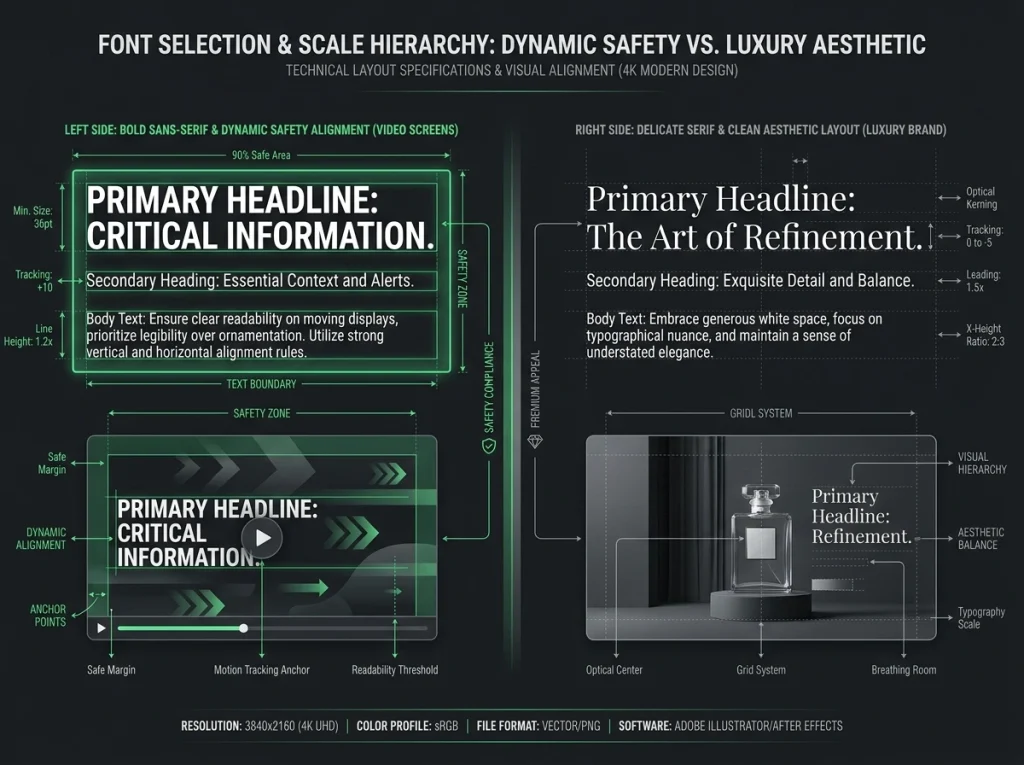
Your font choices should reflect your brand’s core identity. For technical, sleek, or modern tech brands, clean geometric Sans-Serif fonts (like Inter, Montserrat, or Roboto) provide exceptional readability on mobile screens. For heritage, editorial, or luxury storytelling, sophisticated Serif font aesthetics can add a layer of prestige—though they must be monitored closely for legibility at smaller scales.
Hierarchy and Scaling
A rigid hierarchy prevents visual clutter. Your system should have explicit, predefined rules for three distinct levels of video text:
Step-by-Step System Implementation Guide
To maintain structural consistency across multiple video editors or complex automated templates, use this production workflow:
| Design Pillar | Technical Requirement | Optimization Goal |
|---|---|---|
| Contrast & Readability | Add drop shadows (soft, 15-30% opacity) or subtle dark backdrops behind text. | Ensures text remains perfectly readable against changing backgrounds. |
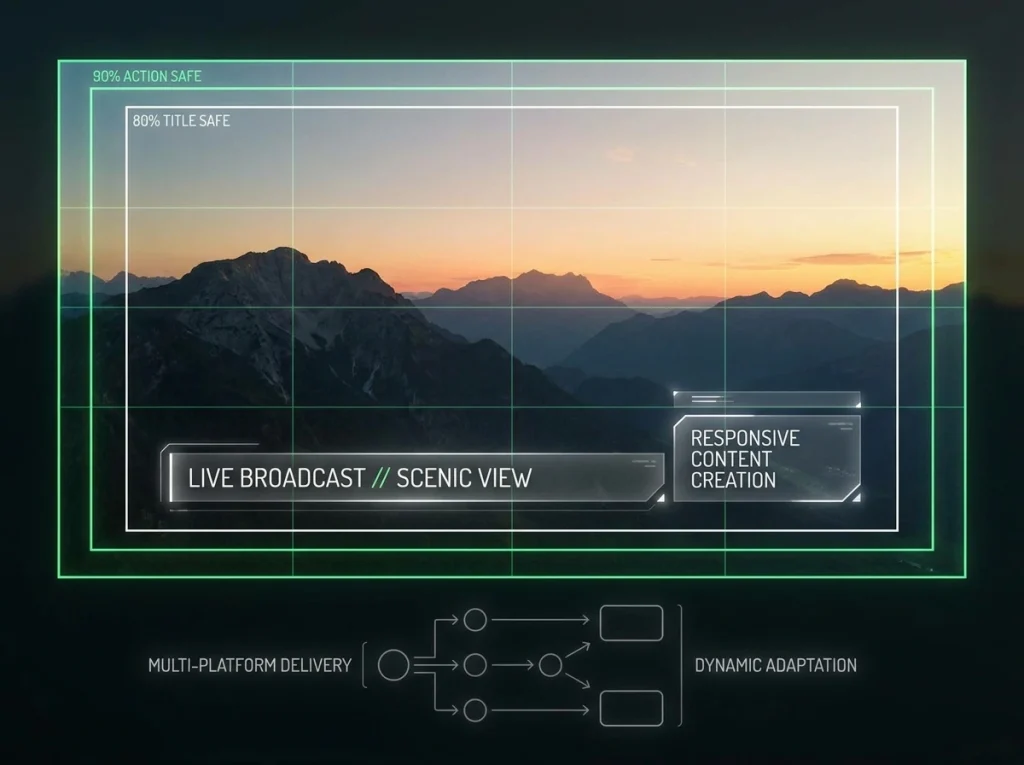
| The Action-Safe Zone | Keep all crucial typographic elements within the inner 90% of your video frame grid. | Prevents text from being cut off by UI elements on TikTok, YouTube Shorts, or diverse TV monitors. |
| Motion Behaviors | Match the text animation style (e.g., snappy cuts vs. elegant fades) to the pacing of the video audio. | Maintains a cohesive mood and prevents the motion graphics from distracting the viewer. |
Pro Tip on Color
“Limit your video typographic palette to three primary functional colors: a dominant brand color for emphasis, a clean high-contrast neutral (pure white or off-white) for body text, and an accent color used exclusively to highlight critical, hyper-important words.”
Avoiding Common Typographic Pitfalls
Even experienced motion designers fall into optimization traps that hurt audience retention. To ensure your video assets rank high in both user satisfaction and visual clarity, watch out for these execution errors:
1 Over-Animating Every Word
Text should slide, pop, or fade into the frame with clear purpose. Kinetic typography that spins, bounces, and shakes continuously creates unnecessary cognitive fatigue, forcing viewers to click away.
2 Ignoring Text Duration
A solid rule of thumb for reading speed calculation is to keep text on screen for at least 0.3 seconds per word, plus an absolute baseline minimum of 1.5 seconds for the viewer to register the visual shift.
3 Compounding Font Styles
Avoid using more than two font families within a single video project. Instead, generate visual contrast by manipulating font weights (e.g., pairing Montserrat Bold with Montserrat Light).
The Long-Term ROI of Visual System Standards
Investing the upfront time to document your system pays massive dividends down the road. Instead of rebuilding graphics from scratch for every upload, your production team can simply pull pre-built title templates, motion graphics files, and caption presets.
Ultimately, strict consistency makes your videos instantly identifiable in a crowded feed. When a viewer scrolls past your content, they shouldn’t need to look at the profile picture to know it’s yours—your typography, layout, and motion language should say it all for you.